Product Updates

See the latest new features, improvements, and product updates
v1
New
Feature
1 year ago
At Brahmin Solutions, we’re committed to making inventory management faster, smarter, and more accessible for manufacturers and warehouse teams. Today, we’re excited to announce the first release of the Brahmin Solutions Mobile App, starting with Receiving—allowing you to scan, count, and receive purchase orders on the go.
But this is just the beginning! 🚀

What’s Available Now?

Receiving – Quickly scan barcodes or search by PO to receive inventory accurately, ensuring real-time stock updates.

What’s Coming Next?

End of MarchInventory Adjustments to help you update stock levels on the go.
Mid-AprilManufacturing & Sales Orders for completing production and managing order fulfillment from any device.
With each release, we’re making it easier to manage your warehouse and shop floor anytime, anywhere—right from your mobile device.

Try It Today!

Get started now by logging in at mobile.brahmin-solutions.com.
📩 Got feedback or questions? We’d love to hear from you! Contact us at support@brahmin-solutions.com.
The Brahmin Solutions Team

v1
Update
Feature
2 years ago
We are thrilled to announce the launch of a new feature that will significantly enhance your production management capabilities. Our new Bulk Activation and Deactivation of BOMs (Bill of Materials) functionality is now available, allowing you to manage multiple BOMs simultaneously. This feature is designed to streamline your workflow and increase efficiency, saving you time and reducing manual effort.
What’s New:
  • Time-Saving Efficiency: With the ability to activate or deactivate multiple BOMs at once, you can eliminate the need for individual updates, drastically cutting down on the time spent on production management tasks.
  • Streamlined Workflow: Manage your BOMs in bulk to ensure that your production processes run smoothly and efficiently, reducing the potential for errors and delays.
  • Ease of Use: Our intuitive interface allows for quick and easy bulk actions, making it simple to update your BOMs according to your production needs.
How to Use the New Feature:
To start using the Bulk Activation and Deactivation of BOMs feature, navigate to the BOMs section from the Manufacturing menu. From there, you can select multiple BOMs and choose to either activate or deactivate them from the bulk actions in the top right corner.
This new feature aligns with our ongoing commitment to providing powerful, user-friendly solutions that help you manage your production processes more effectively. By enabling bulk actions, we aim to save you time, reduce errors, and improve your overall operational efficiency.
We encourage you to explore this new functionality and see the difference it can make in your day-to-day operations. Please visit our support center or contact our customer service team for detailed instructions on setting up and utilizing the Bulk Activation and Deactivation of BOMs.
Your feedback is crucial to us as we continue to enhance our platform. If you have any thoughts or suggestions regarding this new feature, we'd love to hear from you.
Thank you for choosing Brahmin Solutions. Here’s to more efficient and streamlined production management!
The Brahmin Solutions Team

v1
New
2 years ago
We're thrilled to announce the release of our newest integration, aimed at enhancing your workflow and boosting your productivity. Introducing the Zapier integration – a powerful tool that connects your favorite apps and automates your tasks seamlessly.
What’s New:
  • Order download with Zapier: Our platform now supports Order Download Via Zapier.
  • Order Status Mapping: You can now set up mappings for three key order statuses between your Zapier integration and Brahmin Solutions. This feature simplifies how orders are processed and updated in your system, reducing manual work and the potential for errors.
    • Confirmed: When Brahmin Solutions receives this order status, orders will automatically be created in Brahmin Solutions as confirmed.
    • Fulfilled: When Brahmin Solutions receives an order status marked as fulfilled from your eCommerce platform, it will automatically fulfill the order in our system.
    • Canceled: If an order is marked as canceled in your Zapier integration, Brahmin Solutions will automatically cancel the order in the system. This feature helps keep your inventory accurate and up-to-date, preventing overselling and ensuring that your stock levels are always correct.
How to Get Started with Zapier Integration:
Activating the Zapier integration is simple; reach out to our support team, and they will assist you in enabling this feature.
This integration aligns with our mission to provide versatile, user-friendly solutions that enhance your business operations. By automating tasks and connecting your favorite apps, we aim to save you time, reduce errors, and improve overall efficiency.
Discover the Benefits Today:
We invite you to explore this new integration and experience the impact it can have on your daily operations. For detailed instructions on setting up and utilizing the Zapier integration, please visit our support center or contact our customer service team.
Your feedback is invaluable to us as we continue to evolve our platform. If you have any thoughts or suggestions about this new feature, we'd love to hear from you.
Thank you for choosing Brahmin Solutions. Here's to more efficient and streamlined business operations!
The Brahmin Solutions Team

v1
Update
2 years ago
In our continuous effort to streamline your experience and improve workflow efficiency, we've introduced a valuable enhancement to the sales order process.
Quote memos will now automatically display within sales order memos, provided the quote is linked to the sales order. This integration ensures that all pertinent information is seamlessly transferred and accessible, enhancing clarity and communication throughout the sales process.
We believe this update will significantly improve the way you manage sales orders and quotes, providing a smoother, more integrated user experience.
As always, we value your feedback and are here to help you make the most of these new enhancements. Should you have any questions or require assistance, please do not hesitate to reach out.
Best regards,
The Brahmin Solutions Team

v1
Update
2 years ago
We're excited to share a significant enhancement to our export functionality that streamlines your data management and analysis processes.
Export Functionality Enhancement:
In our latest update, we've refined the export options for variants to include "Category" and "Brand" as distinct columns in your exported files. This improvement is designed to provide you with a more comprehensive overview of your data, enabling easier sorting, filtering, and analysis. Whether you're tracking inventory, analyzing sales trends, or preparing reports, these additional columns offer greater insights and flexibility in managing your data.
We understand the importance of having detailed and organized data at your fingertips. This enhancement is a direct response to your feedback, aiming to make your data export process as efficient and informative as possible.
As always, we are here to support you and welcome any feedback or suggestions regarding this update or any other features you’d like to improve.
Thank you for your continued partnership.
Best regards,
The Brahmin Solutions Team

v1
Fix
2 years ago
We are pleased to announce an important update to our email service that significantly improves the reliability and effectiveness of your email communications.
Critical Email Subject Line Fix:
We've identified and resolved a critical issue that affected email subject lines. Previously, emails without a dynamic field in the subject line were not being sent with the correct subject heading. This update rectifies that problem, ensuring all emails are delivered as intended, with accurate and effective subject lines.
This enhancement is part of our ongoing commitment to provide you with the most reliable and efficient tools for your outreach efforts. Accurate subject lines are crucial for the success of email campaigns, and this fix is designed to improve open rates and engagement with your audience.
We appreciate your understanding and patience as we continue to improve our platform. Your feedback is invaluable to us, and we encourage you to share any further insights or issues you encounter.
Thank you for your continued support.
Best regards,
The Brahmin Solutions Team

v1
Update
Feature
2 years ago
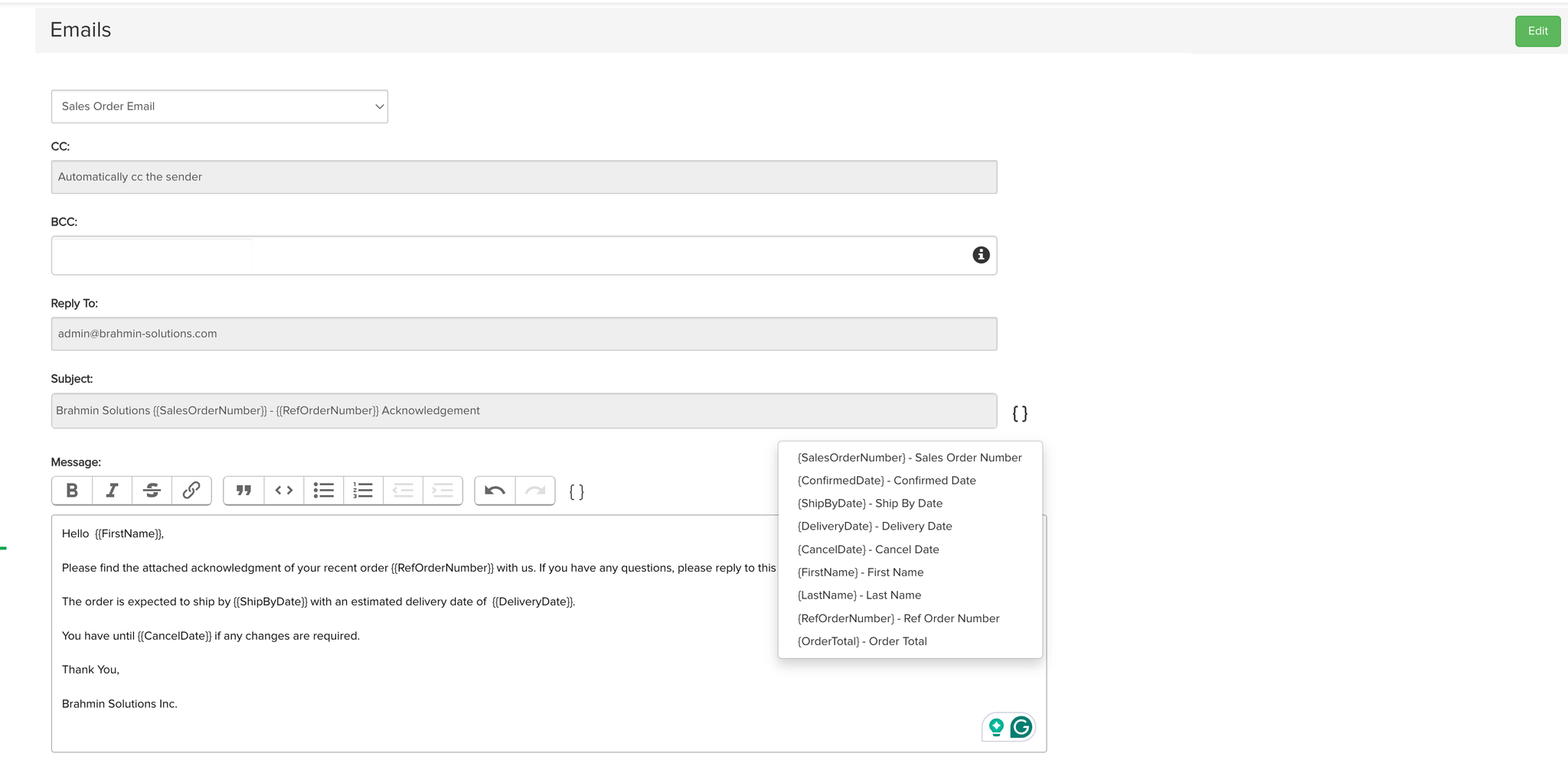
We're excited to announce a new feature that's now available to all our users: Customizable Email Communications. This update introduces the ability to personalize Sales Order Emails, Invoice Emails, and Packing Slip Emails with dynamic fields.
What's New?
  • Dynamic Fields in Email Content: Personalize your emails by inserting dynamic fields into the body. Include specific details like customer names, order information, and tracking numbers to make each communication more relevant and engaging.
  • Custom Email Subjects: Capture your recipients' attention from the get-go by crafting custom subjects for your emails. Tailor each subject line to fit the email’s purpose and context, making your messages stand out in any inbox.
How to Use It?
  1. Go to your settings and email menu.
  1. Choose the email type you want to customize.
  1. Select and add dynamic fields to your template.
  1. Save your changes, and you're all set!
Image without caption
This feature is designed to give you more control over how you communicate with your customers, making your messages more impactful. We believe personalized communication is key to building stronger relationships with your customers, and we're excited to see how you'll use these new capabilities to enhance customer engagement.
Start exploring these new features today and take your customer communications to the next level. For more details on how to make the most of these updates, visit our help center or contact our customer service team via our chat.
We’re committed to continuously improving our platform to meet your needs and help your business thrive. Stay tuned for more updates!
Your Feedback Matters:
Your input is invaluable to us as we strive to improve our services. If you have any feedback or suggestions, please don’t hesitate to get in touch.
Happy customizing!
The Brahmin Solutions Team

v1
Update
New
Feature
2 years ago
We're excited to announce the launch of our latest feature, designed to streamline your online store management and improve your operational efficiency. Our new Real-Time Inventory Sync with BigCommerce ensures that your inventory levels are always up-to-date, automatically pushing any changes in inventory directly to your BigCommerce store.
What’s New:
  • Real-Time Inventory Updates: Say goodbye to manual updates and inventory discrepancies. Our system now automatically syncs all inventory changes in real-time directly to your BigCommerce store, ensuring that your product listings are always accurate.
  • Automatic Push to BigCommerce: Any changes in your inventory, whether it's new stock additions, sales, or returns, are instantly reflected in your BigCommerce store. This seamless integration means no more overselling or stockouts, leading to a better shopping experience for your customers.
How to Enable Real-Time Sync:
Getting started with Real-Time Inventory Sync to BigCommerce is easy; message our support team, and they will enable this setting for you.
This feature is part of our ongoing commitment to providing powerful, user-friendly solutions that help you manage your e-commerce business more effectively. By ensuring that your inventory is always synchronized, we aim to save you time, reduce errors, and improve your customer satisfaction.
Explore the Benefits Today:
We encourage you to explore this new feature and see the difference it makes in your day-to-day operations. For further details on setting up and maximizing the Real-Time Inventory Sync with BigCommerce, please visit our support center or contact our customer service team.
Your feedback is crucial to us as we continue to enhance our platform. We'd love to hear from you if you have any thoughts or suggestions regarding this new feature.
Thank you for choosing Brahmin Solutions. Here's to more seamless selling!
The Brahmin Solutions Team

v1
Feature
New
2 years ago
We're excited to announce a new feature that streamlines your workflow and integrates more seamlessly with your eCommerce channels. Our latest update introduces the ability to map order statuses directly from your eCommerce platforms to Brahmin Solutions orders, ensuring that your order management process is more efficient and automated.

Key Highlights:

Order Status Mapping: You can now set up mappings for three key order statuses between your eCommerce channels and Brahmin Solutions. This feature simplifies how orders are processed and updated in your system, reducing manual work and the potential for errors.
  • Confirmed: When Brahmin Solutions receives this order status, orders will automatically be created in Brahmin Solutions as confirmed.
  • Fulfilled: When Brahmin Solutions receives an order status marked as fulfilled from your eCommerce platform, it will automatically fulfill the order in our system.
  • Cancelled: If an order is marked as cancelled in your eCommerce channel, Brahmin Solutions will automatically cancel the order in the system. This feature helps keep your inventory accurate and up-to-date, preventing overselling and ensuring that your stock levels are always correct.
This update is part of our commitment to making Brahmin Solutions the most responsive and user-friendly software available. We believe these enhancements will significantly impact your daily operations, giving you more time to focus on growing your business.
Stay tuned for more updates as we continue to improve Brahmin Solutions based on your feedback on the evolving needs of SMB Brands.
Your Feedback Matters:
Your input is invaluable to us as we strive to improve our services. If you have any feedback or suggestions, please don’t hesitate to get in touch.
Happy order mapping!
The Brahmin Solutions Team

v1
New
2 years ago
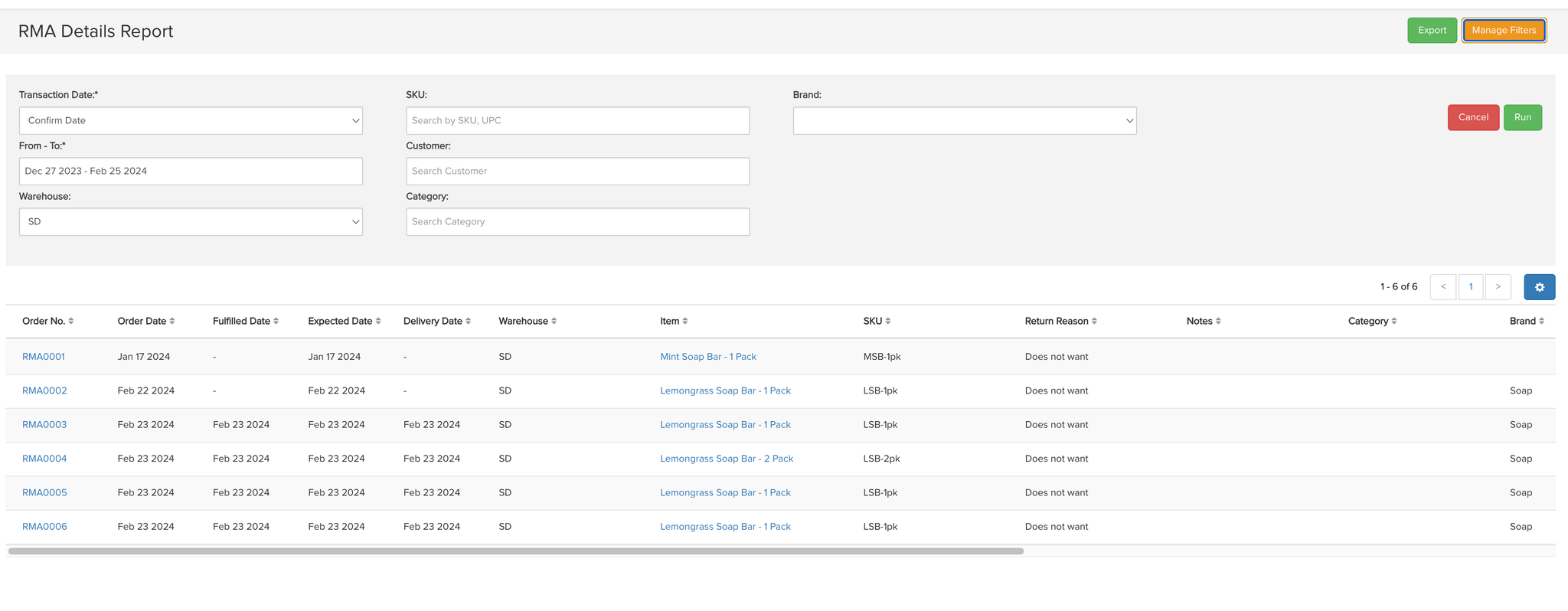
We're excited to announce the launch of a highly anticipated feature in Brahmin Solutions - the RMA (Return Merchandise Authorization) Report. This new reporting tool is designed to significantly enhance how businesses manage and analyze their returns, making the process more efficient and data-driven.
Key Features of the RMA Report:
  • Comprehensive Search Capabilities: Quickly find specific RMA details with our advanced search functionality. Whether you're looking for RMAs by customer name, date range, status, or any other criteria, our intuitive search makes it easy to find the information you need.
  • Dynamic Filtering Options: Filter your RMA data to see exactly what you need. Our dynamic filters allow you to narrow your search results, making it easier to analyze trends, identify issues, and make informed decisions about your returns policy and process.
  • Export Functionality: Need to share your RMA data or analyze it further? Our export feature allows you to download your RMA details in a convenient format, making it simple to share with team members or integrate into your other reporting tools.
How to Access the RMA Report:
  1. Log in to your Brahmin Solutions dashboard.
  1. Navigate to the 'Reports' section.
  1. Select 'RMA Details Report' from the list of available sales reports.
Image without caption
Why This Matters:
Returns are a critical aspect of any e-commerce or retail business, and managing them efficiently is key to maintaining customer satisfaction and operational efficiency. The RMA Report in Brahmin Solutions gives you the insights you need to streamline your returns process, reduce costs, and improve the customer experience.
We Want to Hear From You:
As always, your feedback is invaluable to us. After you've had a chance to explore the new RMA Report feature, we'd love to hear your thoughts. Your input helps us continue to improve and ensure our solutions meet your needs.
Stay Tuned:
This update is just one part of our ongoing efforts to enhance Brahmin Solutions Reports and provide you with the best possible tools to manage your business. Keep an eye out for more updates and new features in the coming months.
Thank you for choosing Brahmin Solutions. We're excited to see how the new RMA Report feature helps transform your returns management process.
Best regards,
The Brahmin Solutions Team

v1
New
2 years ago
At Brahmin Solutions, we believe that the best workflows come from tools that not only work well independently but also complement each other seamlessly. It's with this philosophy of synergy in mind that we're thrilled to introduce our latest feature: a streamlined integration for effortlessly connecting your BigCommerce store to Brahmin Solutions.
With this new integration, the harmony between your sales platform and inventory management becomes a reality. Upon establishing the connection, an automatic import of your customers, stock, products, and sales orders from BigCommerce to Katana is initiated, setting the stage for a unified operation. But it doesn't stop there; the integration also supports ongoing synchronization of stock levels, sales orders, and sales order fulfillment statuses between both platforms.
This means you're not just connecting two systems; you're creating a cohesive ecosystem that updates in real-time, ensuring your business runs as smoothly and efficiently as possible. Welcome to a world where your operational tools are in perfect sync, brought to you by the synergy-driven integration between Brahmin Solutions and BigCommerce.

Get the most out of the BigCommerce integration

BigCommerce stands out as a leading e-commerce solution for both B2C and B2B markets, offering a robust suite of functionalities designed to meet the diverse needs of medium to large-scale retailers. Its comprehensive approach to e-commerce management streamlines workflows and enhances operational efficiency, making it an ideal platform for businesses aiming to scale and achieve significant milestones. The integration of Brahmin Solutions with BigCommerce represents a powerful synergy designed further to bolster your company's growth trajectory and operational capabilities.
Linking Brahmin Solutions with your BigCommerce store streamlines your e-commerce operations with these straightforward benefits:
  • Instant Sales Overview: Keep an eye on your sales as they happen, and make quick decisions to boost performance.
  • Easy Order Management: Download your orders to Brahmin Solutions with ease, making managing and fulfilling them simpler and more accurate.
  • Fulfill MTO and MTS orders simultaneously: Handle MTO (Make-to-order) and MTS (Make-to-stock) orders easily, keeping your business agile and your inventory right.
  • Smart Business Insights: Use sales data to make smart choices that help your business grow and satisfy your customers.
  • All-in-One Inventory Control: Keep track of your stock in one place, ensuring consistency and preventing inventory issues.
Integrating Brahmin Solutions with your BigCommerce store enhances your operational efficiency and empowers your business to adapt and thrive in the dynamic e-commerce landscape. Take advantage of this powerful combination to support your company's growth, achieve operational milestones, and deliver exceptional customer experiences. Start today and transform the way you manage your e-commerce business with Brahmin Solutions and BigCommerce integration. The Brahmin Solutions Team

Powered by Notaku